> For the complete documentation index, see [llms.txt](https://docs.vibrant.io/vibrant/llms.txt). Markdown versions of documentation pages are available by appending `.md` to page URLs; this page is available as [Markdown](https://docs.vibrant.io/vibrant/vibrant-sandbox/partners-working-on-behalf-of-merchants.md).
# Partners working on behalf of merchants
It is possible to have accounts connected - such that a partner is capable of helping out with administration tasks for the merchant.
Administration tasks includes:
* Terminals
* Users
* Api keys
* Products
* Spots
It is possible to 'Work on behalf' using our API or directly from the Payment Platform.
### In the Payment Platform
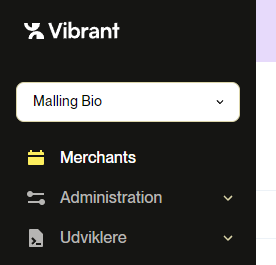
When logging in as a partner, a dropdown enables partners to select between connected merchants.
When selecting a merchant all operations will change data for that merchant.
Try it out here:
Sandbox:
Production:
### Using the API
Whether you code, use a tool (like Postman) or you use Swagger docs it is possible to provide an accountId in the header of your request and this enables you to 'work on behalf'.
Simply add the header: `accountIdOnBehalfOf` - and all will work like a charm.